Every chatbot demo looks great for about eight turns. Then the wheels come off.
You've seen it. The bot that introduced itself five minutes ago suddenly forgets your name. The "travel assistant" that asked about your dietary restrictions in turn three happily recommends a steakhouse in turn twenty. The support agent that loses the thread of the ticket it's supposed to be resolving.
The usual diagnosis is "the model needs more context." So people do the obvious thing: re-send the entire transcript on every single call. It works — right up until it doesn't. You blow the context window, your latency creeps up, and you're paying for thousands of tokens of stale conversation on every turn just to remind the model what it already said. That's not memory. That's a tax.
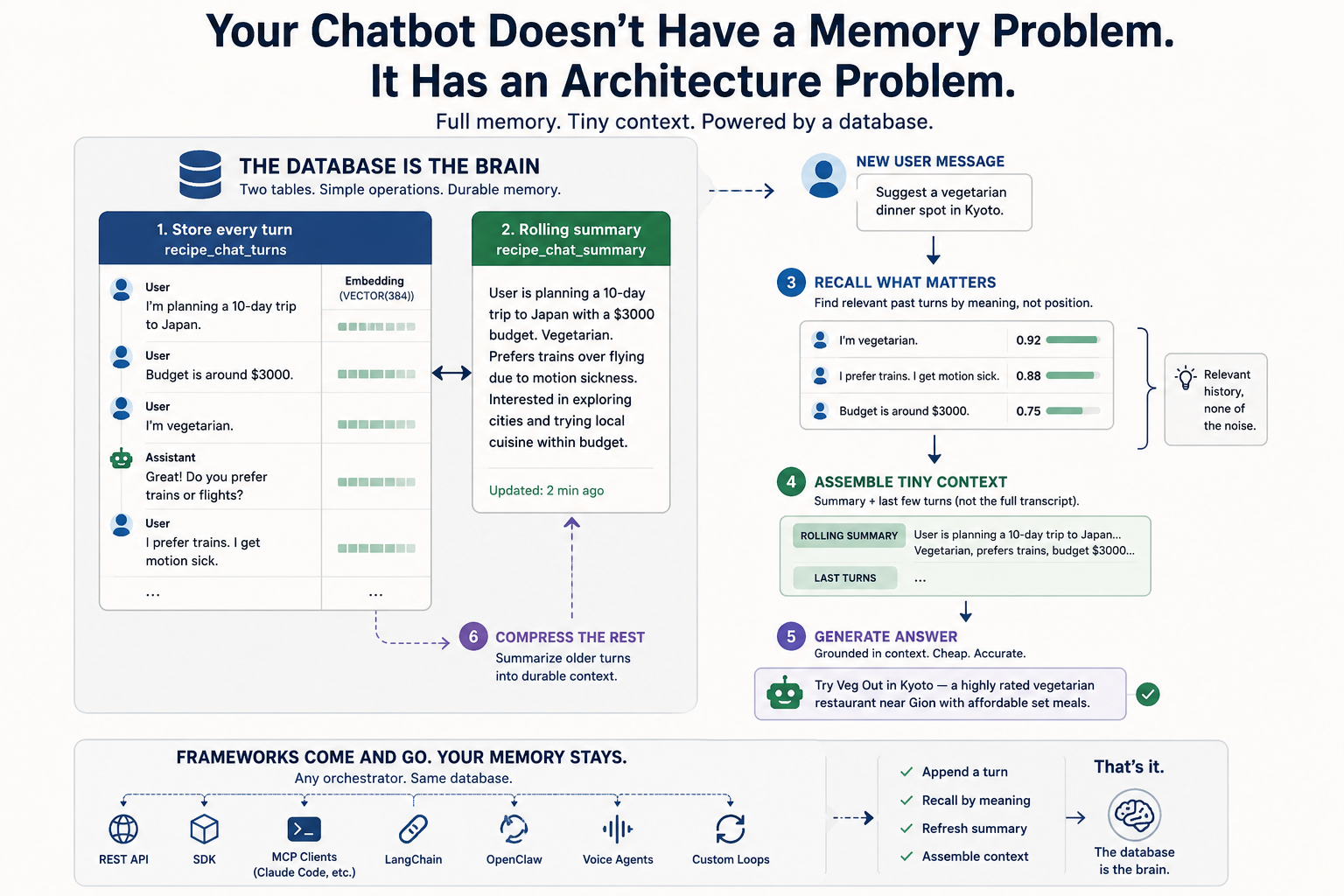
I want to walk through how I actually solve this, because the fix isn't a bigger context window or a cleverer prompt. It's a database pattern. Two tables and a handful of SQL operations.
The core idea: two layers, not one
Human memory isn't a transcript. You don't replay every word of a conversation to recall what someone wants. You keep a compressed sense of the whole thing — vegetarian, on a budget, hates flying — plus a sharp recollection of the last couple of exchanges. Everything older gets summarized down to what matters.
That's exactly the architecture a chatbot needs:
- Store the full history so you can recall any past turn by meaning, not by position.
- Maintain a rolling summary of older turns so the model carries durable context cheaply.
- Feed the model the summary plus the last few verbatim turns — never the whole log.
Full memory, tiny context. Let me show you the whole thing in SQL.
Step 1 & 2: Two tables
One table holds every message, embedded for semantic recall. The other holds one rolling summary per session — the compressed memory of everything that came before the recent window.
CREATE TABLE IF NOT EXISTS recipe_chat_turns (
  turn_id     INTEGER PRIMARY KEY,
  session_id  TEXT,
  role        TEXT,                 -- 'user' or 'assistant'
  content     TEXT,
  created_at  TIMESTAMP DEFAULT CURRENT_TIMESTAMP,
  embedding   VECTOR(384)
);

CREATE TABLE IF NOT EXISTS recipe_chat_summary (
  session_id  TEXT PRIMARY KEY,
  summary     TEXT,
  updated_at  TIMESTAMP DEFAULT CURRENT_TIMESTAMP
);
Notice the VECTOR(384) column sitting right next to your text. No separate vector database, no sync job, no second system to operate. The embedding lives in the same row as the message. That detail matters more than it looks — I'll come back to it.
Step 3 & 4: Record and embed
Drop in a realistic conversation — a 10-day Japan trip, $3000 budget, vegetarian, prefers trains, gets motion sick — the kind of session that's already too long to resend in full every turn. Then embed every message in a single statement:
UPDATE recipe_chat_turns SET embedding = EMBED(content);
EMBED() is a function in the query. The constraints the user mentioned ten turns ago are now recallable by meaning.
Step 5: Recall what matters, not everything
Here's where the "re-send the whole transcript" crowd loses. When the user asks something new, you don't need the entire log. You need the three turns that are actually relevant:
SELECT turn_id, role, content,
       COSINE_SIMILARITY(
         embedding,
         EMBED('what are the user''s dietary and travel constraints?')
       ) AS relevance
FROM recipe_chat_turns
WHERE session_id = 's1'
ORDER BY relevance DESC
LIMIT 3;
That query surfaces the vegetarian / rail / motion-sickness turns and ignores the small talk. Relevant history, none of the noise.
Step 6: Compress the rest into a rolling summary
Flatten the transcript, then generate a durable summary from it — again, right in the query:
INSERT INTO recipe_chat_summary (session_id, summary)
SELECT session_id,
       GENERATE('Summarize this chat as durable user context in 2-3 sentences (preferences, constraints, goal): ' || transcript)
FROM recipe_chat_transcript;
GENERATE() calls the model from inside SQL. Two or three sentences capture the budget, the cities, the preferences. You refresh this every N turns instead of on every call.
Step 7 & 8: Assemble cheap context, then answer
Now combine the rolling summary with only the last two verbatim turns — and generate the reply grounded in that:
SELECT GENERATE(
  'You are a travel assistant. Context: ' || summary ||
  ' The user now asks: Suggest a vegetarian dinner spot in Kyoto. Answer in one sentence respecting their constraints.') AS reply
FROM recipe_chat_summary WHERE session_id = 's1';
The model answers with a vegetarian Kyoto suggestion that respects every constraint — and it did it on a fraction of the tokens a full transcript would have cost.
Why this is a database pattern, not a framework feature
Here's the part I care about most, and the reason I keep pushing this point: the database is the brain; the framework is swappable.
Conversation memory here is just two tables and the same data operations — append a turn, recall by meaning, refresh the summary, assemble the context. That's it. So it doesn't matter what's driving your bot. REST, an SDK call, an MCP client like Claude Code or a custom loop, OpenClaw, LangChain, a voice agent — they all read and write the same tables. No memory abstraction baked into one framework you'll regret choosing in six months.
I've watched too many teams couple their entire memory layer to whatever orchestration library was hot that quarter, then spend the next year unwinding it. Don't. Keep the memory in the database where it belongs, and treat the framework as a detail you can change your mind about.
That's also why I built this with embeddings, SQL, and GENERATE() living in one engine. Every time you split semantic recall into a separate vector store and the text into a separate database, you've signed up for a sync problem and a second thing to operate at 3 a.m. One row, one place, one query language.
Two things this post deliberately left out — and the recipe doesn't
The embedding model. VECTOR(384) in the recipe is sized for the default Community Edition embedder, MiniLM (all-MiniLM-L6-v2) — fast, fine for conversational recall, and a deliberate floor. For production retrieval that needs more nuance, swap to a 768-dim model (nomic-embed-text, bge-base-en-v1.5) or a cloud 1536-dim model (text-embedding-3-small). The recipe now includes the full swap procedure, including the docker-volume cache trick, and links to the GGUF model swap guide.
Retention and right-to-erasure. Storing every turn forever with no policy is the wrong default. The recipe now ships a DELETE cascade for GDPR Article 17 — raw turns, their embeddings (same row, one statement), and the summary that absorbed them — plus a time-based retention pattern. Because the embedding is a column on the message row, you don't have the cross-store deletion-propagation problem you'd have with a separate vector database. One row, one place, one delete.
If you saw the earlier version of this post and wanted those sections, the recipe is the home for the full treatment.
The next-step variant — when the bot is supposed to remember what you said
The rolling summary is the floor of decent chatbot memory. It's where everyone should start. But for any chatbot whose conversations have durable structure — preferences, constraints, goals, the things a user states and expects the bot to act on twenty turns later — there's a better second table.
A typed fact collection instead of one prose summary. One row per durable attribute, keyed on (session_id, category, fact_key). When the user changes their mind ("I'm vegetarian" → "actually I eat fish now") the runtime updates one row in place — the old belief is gone, not summarized over, not coexisting inside a paragraph. Surgical updates, no contradiction accumulation, observable beliefs you can SELECT * FROM and read out loud.
I wrote a follow-up post and a parallel recipe that walks through this:
👉 The Next Step: Replace the Rolling Summary with a Fact Collection
You ship both layers, not one or the other — recent-turn semantic recall for anchoring, structured facts for durable belief.
Run it yourself
Reading SQL is one thing. Watching it run is another. This whole pattern is a free recipe you can paste into a running instance and execute end to end in about fourteen minutes — turn buffer, semantic recall, and auto-summary, all in one SQL database. You can install the Community Edition free and have it running in about thirty seconds.
👉 Conversation Memory + Rolling Summary for a Chatbot
If this clarified how chatbot memory should work — or saved you from re-sending a transcript on every call — do me a favor and hold the clap button (you can leave more than one 👏). And subscribe if you want more hands-on tutorials like this; I publish practical, build-it-yourself walkthroughs on AI-native data infrastructure regularly, and the next ones go straight to your feed.
What's the worst context-window blowup you've hit in production? Tell me in the responses — I read them.