
This is the tutorial version of Agentic Memory Systems: The Complete Guide. The guide explains what an agentic memory system is and why the multi-store stack hurts. This post is the how — a working chat memory system you can stand up in an afternoon, with code you can paste, on data you bring. The implementation uses SynapCores' Community Edition because that's the engine I work on every day, but the pattern translates to any stack that supports vectors and a graph in one place (or a vector store plus a graph store if you're willing to wear the sync cost).
By the end of this you'll have: a chat agent that remembers facts across sessions, can recall by meaning and by relationship, summarizes old conversations into durable facts, and lets you audit which memory contributed to which answer. The total code is under 300 lines and the demo data is fictional.
What we're building
A chat memory system has four jobs:
- Write new memories from each turn of the conversation.
- Retrieve relevant memories when the user sends a new message.
- Consolidate old detailed memories into durable summaries (so the store doesn't grow forever).
- Audit which memories influenced any given response.
We'll build all four, in order, with real code at each step.
Step 0: setup
You'll need:
- SynapCores Community Edition running locally on port 8080.
- An OpenAI-compatible LLM endpoint (the CE ships with an Ollama integration, or point at OpenAI/Anthropic).
- Python 3.10+ for the orchestration. The Rust SDK or any HTTP client would also work; I'll use Python for readability.
A minimal client setup:
import os, json, requests

SC_URL = os.environ.get('SYNAPCORES_URL', 'http://localhost:8080')

def sql(query, params=None):
    r = requests.post(f"{SC_URL}/sql", json={"query": query, "params": params or {}})
    r.raise_for_status()
    return r.json().get('data', [])
Step 1: the memory schema
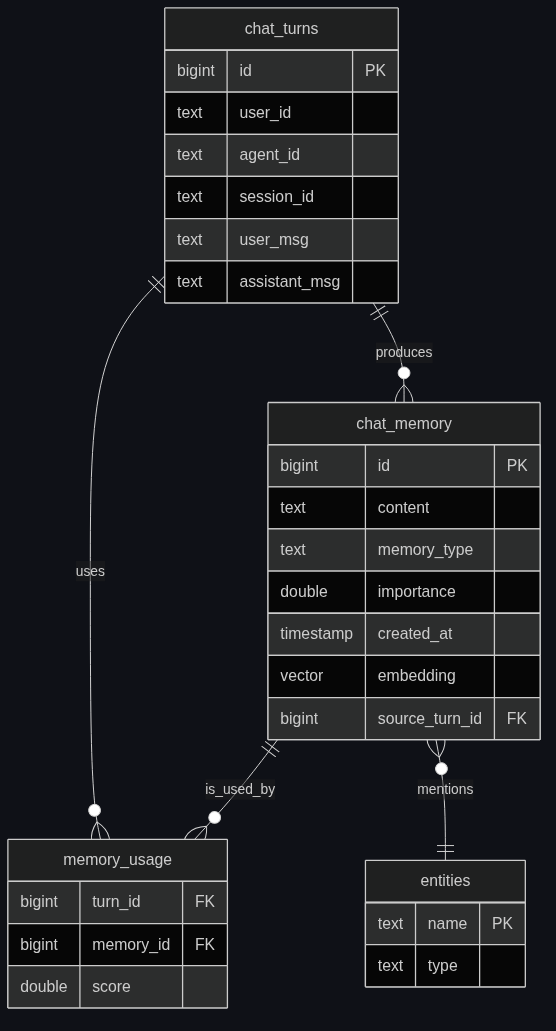
A memory has a few essential properties: who/what it's about, what it says, when it was created, how important it is, and an embedding for semantic recall. We'll also model entities and edges so we can do multi-hop recall later.
-- One row per atomic memory
CREATE TABLE chat_memory (
  id BIGINT PRIMARY KEY,
  agent_id TEXT NOT NULL,
  user_id TEXT NOT NULL,
  session_id TEXT,
  content TEXT NOT NULL,
  memory_type TEXT NOT NULL,   -- 'fact' | 'event' | 'preference' | 'summary'
  importance DOUBLE DEFAULT 0.5,
  created_at TIMESTAMP DEFAULT CURRENT_TIMESTAMP,
  last_accessed_at TIMESTAMP,
  source_turn_id BIGINT,        -- for audit
  embedding VECTOR(384)
);

CREATE INDEX chat_memory_embedding_idx ON chat_memory
USING HNSW (embedding COSINE) WITH (M = 32, ef_construction = 400);

-- The graph side: entities mentioned, edges between them
-- (SynapCores' Cypher engine shares storage with the SQL planner,
-- so we MERGE entities at write time and traverse them at read time.)
Two things worth noting:
memory_typeseparates facts from events from preferences. Different recall strategies later. (Yes, this is the cognitive-architectures taxonomy from the memory guide.)source_turn_idis the audit hook. Every memory points back to the chat turn that produced it.
Step 2: writing memories
When a chat turn comes in, we don't just dump the whole message into memory — that fills the store with junk. We extract three things:
- Atomic facts the user stated or implied ("I live in San Diego").
- Preferences they revealed ("I prefer concise answers").
- Events that happened ("they asked about pricing").
The extraction itself is a call to the LLM, but the write is in SQL. The trick is to make the LLM extraction deterministic-ish by giving it a schema.
def extract_memories(user_message, assistant_response, user_id):
    prompt = f"""
You are a memory extractor. From the conversation turn below, extract:
- facts (things stated as true about the user or world)
- preferences (stated likes/dislikes/style preferences)
- events (things that happened in the conversation)

Return JSON ONLY:
{{"facts": [...], "preferences": [...], "events": [...]}}

User: {user_message}
Assistant: {assistant_response}
"""
    # SynapCores can do this inline with GENERATE() but we'll do it
    # from Python so the tutorial reads like a normal LLM client.
    r = sql("SELECT GENERATE(:p) AS out", {"p": prompt})
    return json.loads(r[0]['out'])
The corresponding SQL write:
def write_memory(agent_id, user_id, session_id, content, memory_type,
                 importance=0.5, source_turn_id=None):
    sql("""
        INSERT INTO chat_memory
          (id, agent_id, user_id, session_id, content, memory_type,
           importance, source_turn_id, embedding)
        VALUES (
          NEXTVAL('chat_memory_id_seq'),
          :a, :u, :s, :c, :t, :i, :st,
          EMBED(:c)
        )
    """, {
        "a": agent_id, "u": user_id, "s": session_id, "c": content,
        "t": memory_type, "i": importance, "st": source_turn_id,
    })
Note the EMBED(:c) inside the INSERT. The embedding happens in the database — no Python service calling an embedding API and writing the result back. This is the SQLv2 point in concrete form: embedding is a SQL function, not a foreign call.
For the entity graph side, we merge entities mentioned in the memory and add MENTIONS edges:
def merge_entities(memory_id, entity_list):
    for ent in entity_list:
        sql("""
            GRAPH MERGE (e:Entity {name: :n, type: :t})
            GRAPH MERGE (m:Memory {id: :mid})
            GRAPH MERGE (m)-[:MENTIONS]->(e)
        """, {"n": ent["name"], "t": ent["type"], "mid": memory_id})
Now every memory is both a row (with an embedding) and a graph node (with edges to its entities).
Step 3: retrieval
When a new user message arrives, we retrieve memories that are relevant. "Relevant" is the magic word. There are three signals:
- Semantic similarity: the memory says something close to the user's question.
- Recency: newer memories are more likely to apply.
- Importance: facts we've already flagged as high-importance get a boost.
A single SQL query fuses all three:
-- Recall query: top-k memories by weighted score
SELECT m.id, m.content, m.memory_type, m.importance, m.created_at,
       COSINE_SIMILARITY(m.embedding, EMBED(:q)) * 0.6
       + (1.0 / (1.0 + EXTRACT(EPOCH FROM (NOW() - m.created_at))/86400)) * 0.25
       + m.importance * 0.15
       AS score
FROM chat_memory m
WHERE m.user_id = :u
  AND m.agent_id = :a
ORDER BY score DESC
LIMIT 8;
That's the vector-flavored recall. For the graph-flavored side — "what other entities did this user mention recently, and what memories are attached to them?" — we walk the graph:
WITH seed_entities AS (
  SELECT e.name, e.type
  FROM chat_memory m
  GRAPH MATCH (Memory {id: m.id})-[:MENTIONS]->(e:Entity)
  WHERE m.user_id = :u
  ORDER BY m.created_at DESC
  LIMIT 10
)
SELECT m2.content, m2.memory_type, m2.created_at
FROM seed_entities se
GRAPH MATCH (e:Entity {name: se.name})<-[:MENTIONS]-(m2:Memory)
ORDER BY m2.created_at DESC
LIMIT 10;
In production you'd fuse these into one query. The split is for explanation.
The retrieval result is what goes into the LLM's context as the "memory you have about this user." A typical implementation feeds 5-12 memories per turn — enough to be useful, not so many that the context window thrashes.
Step 4: the chat loop
Putting it together: the agent loop that uses memory at both read and write.
def chat_turn(agent_id, user_id, session_id, user_message):
    # 1. Retrieve relevant memories
    memories = sql("""
        SELECT id, content, memory_type, importance, created_at,
               COSINE_SIMILARITY(embedding, EMBED(:q)) * 0.6
               + (1.0 / (1.0 + EXTRACT(EPOCH FROM (NOW() - created_at))/86400)) * 0.25
               + importance * 0.15 AS score
        FROM chat_memory
        WHERE user_id = :u AND agent_id = :a
        ORDER BY score DESC LIMIT 8
    """, {"q": user_message, "u": user_id, "a": agent_id})

    # 2. Build the LLM context with memories
    memory_block = "\n".join(f"- ({m['memory_type']}) {m['content']}" for m in memories)
    system_prompt = f"""You are a helpful assistant. Use this memory of the user when relevant:
{memory_block}
"""

    # 3. Generate the assistant response
    response = sql("SELECT GENERATE(:p) AS out", {
        "p": system_prompt + "\nUser: " + user_message
    })[0]['out']

    # 4. Log the turn (so memories can point back to it)
    turn_id = sql("""
        INSERT INTO chat_turns (id, user_id, agent_id, session_id, user_msg, assistant_msg)
        VALUES (NEXTVAL('chat_turn_id_seq'), :u, :a, :s, :um, :am)
        RETURNING id
    """, {"u": user_id, "a": agent_id, "s": session_id,
          "um": user_message, "am": response})[0]['id']

    # 5. Extract & write new memories
    extracted = extract_memories(user_message, response, user_id)
    for fact in extracted.get('facts', []):
        write_memory(agent_id, user_id, session_id, fact, 'fact',
                     importance=0.7, source_turn_id=turn_id)
    for pref in extracted.get('preferences', []):
        write_memory(agent_id, user_id, session_id, pref, 'preference',
                     importance=0.9, source_turn_id=turn_id)
    for event in extracted.get('events', []):
        write_memory(agent_id, user_id, session_id, event, 'event',
                     importance=0.3, source_turn_id=turn_id)

    # 6. Record which memories were used (audit trail)
    for m in memories:
        sql("""INSERT INTO memory_usage (turn_id, memory_id, score)
               VALUES (:t, :m, :s)""",
            {"t": turn_id, "m": m['id'], "s": m['score']})

    return response, memories
That's the whole loop. Six steps, each one a SQL statement or a single LLM call. The "memory system" is not a separate service — it's a pattern over the database you already have.
Step 5: consolidation
Memories accumulate. If you write three memories per turn and the user has 100 turns a day, that's 300 memories per user per day. After a month: 9,000. After a year: 110,000. You don't want a vector index of that size for one user, and you don't want the LLM to wade through 110,000 facts.
The fix is consolidation: periodically summarize old, detailed memories into durable abstract facts. This is what the cognitive-architectures literature calls "consolidation" or "reflection."
-- Find old, low-importance memories that haven't been touched recently
WITH consolidation_candidates AS (
  SELECT id, content
  FROM chat_memory
  WHERE user_id = :u
    AND memory_type = 'event'
    AND created_at < NOW() - INTERVAL '30 days'
    AND last_accessed_at < NOW() - INTERVAL '14 days'
  ORDER BY created_at ASC
  LIMIT 50
)
-- Summarize them into one durable memory
INSERT INTO chat_memory (id, agent_id, user_id, content, memory_type,
                         importance, embedding)
SELECT NEXTVAL('chat_memory_id_seq'),
       :a, :u,
       GENERATE('Summarize these past events into 3-5 durable facts about the user: '
                || STRING_AGG(content, ' | ')),
       'summary',
       0.6,
       EMBED(GENERATE('...'))
FROM consolidation_candidates;

-- Then archive (or delete) the originals
UPDATE chat_memory SET memory_type = 'archived'
WHERE id IN (SELECT id FROM consolidation_candidates);
You run this as a cron job (or a SynapCores scheduled query). The store stays bounded, and the summary memories become more valuable over time — they're the "durable knowledge" tier, distilled from the noisy detail tier.
Step 6: audit
The memory_usage table built in step 4 lets you answer the question every product team asks eventually: "Why did the agent say that?"
-- Show me the memories that contributed to turn 4837
SELECT m.id, m.content, m.memory_type, mu.score, m.source_turn_id
FROM memory_usage mu
JOIN chat_memory m ON m.id = mu.memory_id
WHERE mu.turn_id = 4837
ORDER BY mu.score DESC;
That's the audit trail. Every assistant response has a row in chat_turns; every row in chat_turns has a set of rows in memory_usage; every row in memory_usage points to a chat_memory row that has a source_turn_id pointing back to where that fact came from. The whole chain is queryable.
This sounds like overhead — it isn't, much. The memory_usage table is append-only and small (8 rows per turn). It pays for itself the first time a user says "the agent told me something weird" and you can answer "here's exactly which memories led to that response."
Where this scales and where it doesn't
A few honest notes on the limits:
Scales fine to:
- ~1M memories per user (HNSW handles this in single-server CE).
- Multiple agents sharing the same memory store (filter by
agent_id). - Multi-tenant with proper row-level filtering.
Hits friction at:
- 100M+ memories per user — you'll want sharding or memory-tier pruning more aggressively.
- High-frequency writes (>100/sec per user) — the consolidation job needs to keep up.
- Truly long-running agents (years of memory) — the consolidation policy is what makes or breaks this. Plan for it.
For the longer architectural take on what each memory type does and where this maps to cognitive-architecture theory, the agentic memory system guide is the companion piece.
Build a multi-agent variant
The same schema supports multi-agent memory sharing — three lines of change. Use a shared agent_id for "shared knowledge" and per-agent agent_id for private state. The retrieval becomes:
... WHERE agent_id IN (:current_agent, 'shared') ...
Now Agent A's discoveries become Agent B's background knowledge. This is the "shared memory" pattern that distinguishes a single-agent assistant from a team of agents — see What Is GraphRAG? for the related pattern when those agents need to reason over relationships.
The full code
The complete tutorial code (all six steps, plus the consolidation cron, plus the audit queries) is published as recipe 020_chat_memory in the SynapCores Community Edition. Run it once on the included sample data, then point it at your own user data. The whole loop fits in a single .py file.
The honest version
We don't have customer logos yet. We're early. What I can show you is the recipe and the runnable proof — and the code above, paste-and-go. Run it on the included sample data, point it at your own users, and the same loop will work without me having to make a single claim about it.
If you want help wiring this into your actual agent on your real data, the Agent Memory JumpStart is the 2-4 week founder-led sprint where we do the integration with you. Free Design Partner track or fixed-fee Paid Pilot from $5,000. Either way you talk to the engineer who built it.
If you want to skip the tutorial and read the architectural overview, the agentic memory system guide is the long-form theory piece.