
I built my first "graph-aware RAG" system the way most people do: I bolted a vector database onto a graph database, added an LLM API on top, and wrote about 800 lines of Python to keep the three in sync. It worked. It also broke the first time a node was updated in one store but not the other, and I spent a weekend tracing a phantom citation through three logs to find a stale edge in Neo4j.
That's where the term GraphRAG comes from. It's not a marketing word — it's the answer to a specific failure mode: vector search alone can't answer "what other things is this thing connected to?", and graph traversal alone can't answer "what does this thing mean?" GraphRAG fuses the two so a retrieval-augmented LLM can reason over relationships, not just bags of nearby chunks.
This post explains what GraphRAG is, why it exists, what the architecture actually looks like, and how to build one without standing up four separate services. The code samples are all SynapCores SQLv2 — but the concepts apply whether you implement them on SynapCores, on a Pinecone+Neo4j+LangChain stack, or on something you write yourself.
What GraphRAG is (and isn't)
GraphRAG is retrieval-augmented generation where the retrieval step uses both vector similarity and graph traversal. The vector index handles meaning ("find chunks about this topic"). The graph handles structure ("follow these relationships out two hops"). The LLM gets a context window that includes both — usually the top-k chunks AND the subgraph around the entities those chunks mention.
What it isn't:
- It isn't "use Neo4j to store your vectors." Putting vectors in a graph database doesn't give you GraphRAG. You need actual relationship traversal in the retrieval path, not just vector storage that happens to live next to nodes.
- It isn't a single algorithm. Microsoft's GraphRAG, LangChain's graph chains, LlamaIndex's KnowledgeGraphIndex, and our recipe-016 implementation are all "GraphRAG" but they make different tradeoffs.
- It isn't only for knowledge graphs. Any data with relationships qualifies: customers and accounts, papers and citations, tickets and resolutions, code and call graphs.
The defining property is that the retrieval result is a subgraph, not a flat list. The LLM sees nodes, edges, and the chunks attached to them — which means it can cite a path of reasoning, not just a snippet.
Why vector-only RAG hits a wall
Vector-only RAG looks like this:
- Chunk your documents.
- Embed each chunk.
- At query time, embed the question.
- Find the top-k most similar chunks.
- Stuff them into the prompt.
This works beautifully for questions that have a single chunk-shaped answer ("what's the return policy?"). It falls over the moment the answer requires synthesizing across entities.
A real example from a support-knowledge-base I helped debug last year: a customer asked "Has any account on the Pro plan ever had this same MRI integration issue?" The vector-only system found tickets about MRI integration. It missed the part where some of those tickets were on the Free plan, and the actual relevant past resolution was filed under a different customer in the same parent organization. The relationship — Account → ParentOrg ← Account → Ticket — is what made the answer findable. The vector index didn't have it.
When I see teams complaining that "RAG hallucinates" or "RAG misses obvious connections," nine times out of ten the failure isn't the LLM. It's that the retrieval step has no way to express "and also walk these edges."
The GraphRAG retrieval shape
A working GraphRAG retrieval has four stages. You can implement them as four queries or fuse them into one — but conceptually they're:
1. Vector seed:   find top-k chunks/nodes by embedding similarity to the question
2. Graph expand:  traverse N hops out from those nodes along typed edges
3. Re-rank:       score the expanded subgraph by relevance + recency + path length
4. Context pack:  return chunks + edge list + node properties to the LLM
Stage 2 is the one most teams skip. They retrieve five chunks and hope the LLM can connect them. The LLM can't, because the relationships (who said this, who's responsible, what came before) were never in the context window.
Here's the same shape in SynapCores SQLv2, which lets you write the whole thing in one query because the vector index and the graph engine share a process:
-- Stage 1+2 fused: seed by vector, expand by graph
WITH seeds AS (
  SELECT node_id, content
  FROM kb_chunks
  WHERE COSINE_SIMILARITY(embedding, EMBED('MRI integration issue on Pro plan')) > 0.65
  ORDER BY similarity DESC
  LIMIT 5
)
SELECT s.content   AS seed_chunk,
       n.label     AS entity,
       e.type      AS relationship,
       m.label     AS connected_entity,
       m.props     AS connected_props
FROM seeds s
GRAPH MATCH (n:Entity {id: s.node_id})-[e*1..2]-(m:Entity)
WHERE m.type IN ('Account', 'Ticket', 'Resolution')
ORDER BY n.recency DESC
LIMIT 20;
That's the entire GraphRAG retrieval path. Stage 3 (re-rank) and stage 4 (context pack) happen in the application layer, but the heavy lifting — vector + graph — is done in one round-trip to the engine.
A worked example: building GraphRAG over a support knowledge base
Let me walk through a concrete build. The data is a hypothetical support knowledge base with:
tickets— text bodies, embeddings, status, account_id, created_ataccounts— id, parent_org_id, plan_tier, regionresolutions— text bodies, ticket_id, embeddings, agent_id- An entity graph extracted from those rows (Account, Ticket, Resolution, Topic).
Step 1: ingest and embed. Standard stuff. Note that EMBED() is a SQL function, not a Python wrapper.
CREATE TABLE tickets (
  id BIGINT PRIMARY KEY,
  account_id BIGINT,
  body TEXT,
  status TEXT,
  created_at TIMESTAMP,
  embedding VECTOR(384)
);

INSERT INTO tickets (id, account_id, body, status, created_at, embedding)
VALUES (1, 42, 'Customer reports MRI scanner timeouts when uploading DICOM batches', 'open', NOW(), NULL);

UPDATE tickets SET embedding = EMBED(body) WHERE embedding IS NULL;
Step 2: build the graph. SynapCores' Cypher mode lets you MERGE nodes and edges in the same transaction as the SQL inserts:
MERGE (t:Ticket {id: 1})
MERGE (a:Account {id: 42})
MERGE (t)-[:FILED_BY]->(a)
MERGE (a)-[:BELONGS_TO]->(o:Org {id: 7})
MERGE (t)-[:ABOUT]->(topic:Topic {name: 'mri-integration'});
Step 3: query. This is where GraphRAG earns its name. The question: "any Pro-plan account ever hit this same integration issue?"
WITH question_seeds AS (
  SELECT id
  FROM tickets
  WHERE COSINE_SIMILARITY(embedding, EMBED('MRI integration timeout Pro plan')) > 0.6
  ORDER BY similarity DESC
  LIMIT 10
)
SELECT t.body          AS ticket,
       a.id            AS account,
       a.plan_tier     AS plan,
       o.id            AS parent_org,
       r.body          AS resolution
FROM question_seeds qs
GRAPH MATCH
  (t:Ticket {id: qs.id})-[:FILED_BY]->(a:Account)
  -[:BELONGS_TO]->(o:Org)
  <-[:BELONGS_TO]-(other_a:Account)
  <-[:FILED_BY]-(other_t:Ticket)-[:HAS_RESOLUTION]->(r:Resolution)
WHERE a.plan_tier = 'Pro' OR other_a.plan_tier = 'Pro'
ORDER BY other_t.created_at DESC
LIMIT 5;
This query — one network round-trip — gives the LLM: the seed ticket, the account that filed it, its parent org, other accounts in the same org, their past tickets on the same topic, and the resolutions attached. That's the subgraph the LLM needs to actually answer.
Where GraphRAG actually helps vs where it doesn't
I want to be honest about this because GraphRAG gets oversold. It is not a free upgrade — it's a different shape that pays off when your data has structure worth traversing.
GraphRAG helps when:
- The question involves entities and their relationships ("how is X connected to Y?")
- The answer requires multi-hop reasoning ("through what chain did this happen?")
- Citation matters ("show me the path of evidence")
- Your domain has natural graph structure: org charts, code call graphs, citation networks, supply chains, fraud rings, knowledge bases with cross-references
GraphRAG is overkill when:
- The data is genuinely flat — say, a corpus of FAQ chunks with no entities worth modeling
- The question is "find the chunk that says X" with no relational context
- You don't have anyone on the team who can model the schema (a bad graph schema is worse than no graph)
The most common mistake I see: teams build a knowledge graph that has no edges. They model (Document)-[:HAS_CHUNK]->(Chunk) and call it done. That's not a graph, it's a list with extra steps. If you don't have real relationships (FILED_BY, MENTIONS, CONTRADICTS, SUPERSEDES), you're paying graph-database tax for vector-only behavior.
The architecture that wastes a weekend
Here's the stack most teams end up with:
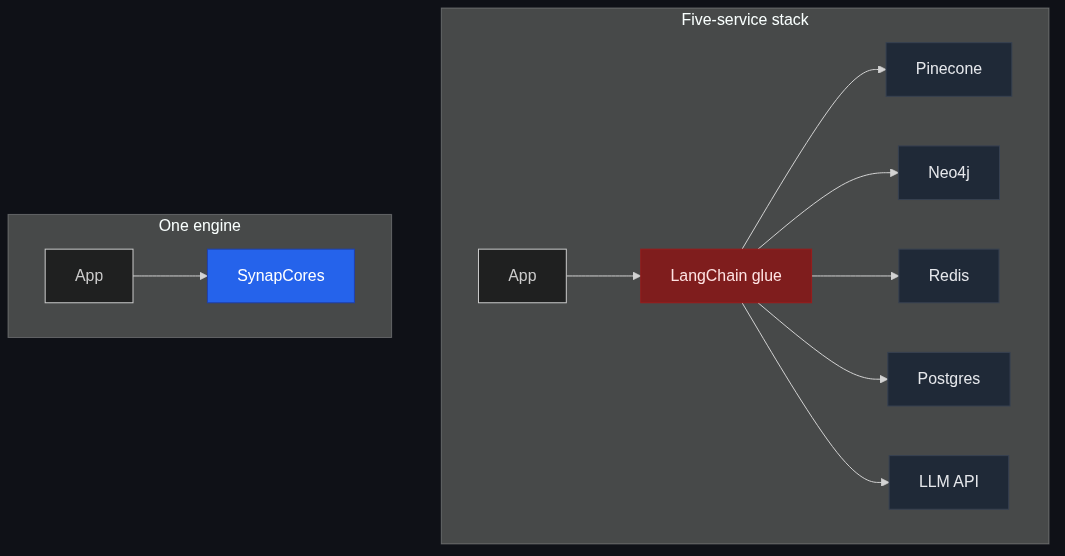
- Pinecone for vectors
- Neo4j for the graph
- Redis for session/cache
- Postgres for "everything else"
- LangChain or LlamaIndex glue
- Two ETL jobs to keep them in sync
Each of those is fine in isolation. The pain is the seams. Every entity write has to go to three places. Every retrieval is a fan-out across two networks. Every debugging session is "which store has the stale data?" When the demo works on day one and breaks on day forty, it's almost always a sync issue.
I'm not saying "always use one binary." I'm saying: if you're choosing this architecture because each component is "best in class," count the seams. The seams are where the bugs live.
Building GraphRAG without the five-service stack
The whole reason we built SynapCores' GraphRAG path is that I got tired of writing the glue. The engine ships with:
- A vector index (HNSW) integrated with the SQL planner
- A native Cypher graph engine that shares the same storage layer
EMBED()andGENERATE()as first-class SQL functions- Recipe
016_graphrag_qnathat you can run in 5 minutes
If you want to try it on your data: download the Community Edition, import the recipe, point it at a CSV or a directory of markdown files, and run the query at the top of this post against your own data. If it doesn't fit your shape, the SDK lets you call individual stages (vector seed, graph expand, re-rank) as separate primitives.
For comparisons with how other tools approach the same problem, see GraphRAG vs Neo4j and GraphRAG vs Traditional RAG. If you're earlier in the stack — still deciding whether you need graph relationships at all — read Why Vector Search Needs Graph Relationships first.
The honest version
We don't have customer logos yet. We're early. What I can show you instead are runnable recipes that produce the exact pattern in this article: the call-routing-agent shape (Customer → Product → Issue), the fraud-ring shape (Account → Device → Account → Card), and the support-bot-memory shape (User → Session → Ticket → Resolution). Download the binary, import a recipe, point it at sample data, and verify the numbers yourself.
If you're building an agent that needs to reason over relationships and you don't want to wire five services to get there, the Agent Memory JumpStart is a 2-4 week founder-led sprint where we wire SynapCores' GraphRAG into your real workflow. There's a free Design Partner track (we eat the work in exchange for feedback and a case study) and a fixed-fee Paid Pilot from $5,000. Either way you talk to the engineer who built it — me — not a sales pipeline.
Or just download the binary and run recipe 016. That's the real demo.