Snowflake and an AI-native database get compared a lot lately, and the comparison is muddier than the PostgreSQL one because the two are not even trying to do the same job. Snowflake is a cloud data warehouse: it exists to run large analytical queries over historical data, separating storage from compute so you can throw enormous parallelism at a GROUP BY over a billion rows. An AI-native database is an operational engine for applications that need vector search, graph traversal, and machine-learning inference inside live request paths. Putting them head to head is less "which is better" and more "which problem are you actually solving."
This post draws the line cleanly, because teams waste real money getting it wrong in both directions.
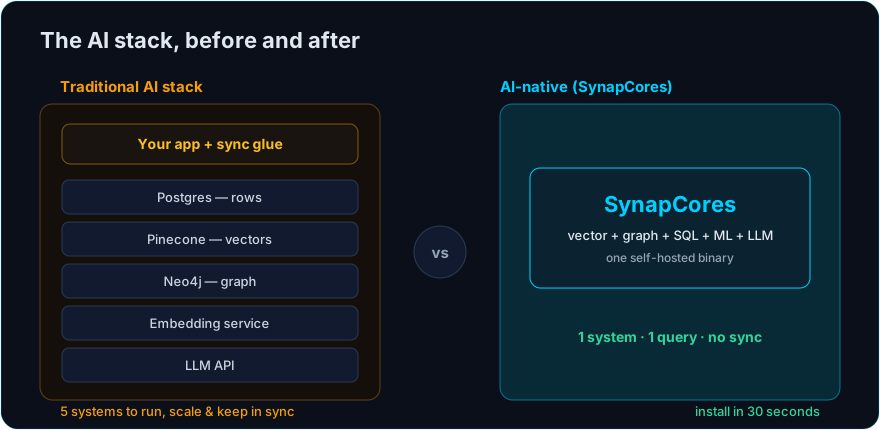
The AI-native engine here is SynapCores — vector, graph, SQL, and in-database AutoML in a single self-hosted binary, with native MCP support and an OpenClaw long-term-memory plugin. The Community Edition is free for macOS, Linux, and Docker. Download the free Community Edition →
A note on scope. Capabilities marked (Enterprise / roadmap) are part of the Enterprise tier or roadmap and are not in the free Community Edition today. Everything unmarked is in the free CE.
What Snowflake is built for
Snowflake's architecture is a genuine achievement. Decoupled storage and compute let you scale query power independently of data volume, spin warehouses up and down on demand, and let many teams query the same data without contending for resources. For business intelligence, financial reporting, large-scale aggregation, and ad-hoc analytical exploration over petabytes, it is outstanding. Snowflake has also added vector support and Cortex AI functions, so it is not standing still on the AI front.
But the shape of the engine tells you what it is for. Snowflake is optimized for scanning large amounts of data in analytical batches. Latency is measured in seconds to minutes, which is exactly right for a dashboard refresh and exactly wrong for a request inside a live application that has a few dozen milliseconds to return a result.
What an AI-native database is built for
An AI-native database is an operational system. It sits in the request path of an application and answers questions like "find the ten documents most similar to this query, expand to related entities, score them with a model, and return — all in under 50 milliseconds." That is a different workload from "aggregate three years of sales by region." It needs low-latency point and similarity lookups, native vector indexes tuned for high-recall retrieval, a graph engine for relationship traversal, and in-database inference so predictions happen where the data lives.
-- Operational, in-the-request-path: embed, rank, predict, return — fast
SELECT product_name,
       COSINE_SIMILARITY(embedding, EMBED(:query)) AS relevance,
       PREDICT(will_convert, :user_id, product_id) AS likelihood
FROM products
WHERE in_stock = true AND relevance > 0.7
ORDER BY likelihood DESC
LIMIT 10;
This query has no business running on a warehouse, and a warehouse query summarizing a quarter of revenue has no business running on an operational engine. They are complementary, not competitive.
The dividing line
| Dimension | Snowflake (warehouse) | AI-native database (operational) |
|---|---|---|
| Primary job | Analytical queries over historical data | Live application requests |
| Latency target | Seconds to minutes | Milliseconds |
| Data freshness | Batch / micro-batch loads | Real-time reads and writes |
| Vector search | Available, analytical-scale | Native, low-latency, planner-aware |
| Graph traversal | Not a native model | Native graph engine |
| In-DB ML inference | Cortex functions | Native (PREDICT, EMBED, GENERATE) |
| Deployment | Cloud service, consumption pricing | Self-hosted single binary |
| Cost model | Pay per compute-second | Runs on hardware you control |
Where teams get it wrong
The first mistake is running operational AI workloads on the warehouse because "the data is already there." You can do semantic search in Snowflake, but paying warehouse compute for millisecond-budget lookups in a hot path is both slow and expensive — every query wakes compute that bills by the second. The second mistake is the mirror image: trying to run heavy historical analytics on an operational engine that was tuned for low-latency retrieval, not petabyte scans.
The third and most common mistake is assuming you must pick one. You usually do not. A mature stack often keeps Snowflake as the analytical warehouse for reporting and uses an AI-native database as the operational engine for the application's live AI features. They serve different layers. The data-control story differs too: Snowflake is a managed cloud service with consumption pricing, while an AI-native database like SynapCores is a self-hosted binary that runs on infrastructure you own — which matters when the data is sensitive or the per-query economics of a cloud warehouse do not fit a high-volume application path.
A simple way to decide
Ask where the query lives. If it lives behind a dashboard or a scheduled report and reads history, that is warehouse work — keep it on Snowflake. If it lives inside a user-facing request and needs vectors, relationships, or model inference returned in milliseconds, that is operational AI work — and an AI-native engine is the right tool. Most organizations of any size end up running both, with a pipeline moving operational data into the warehouse for analysis. For the broader architectural picture, see the AI-Native Database guide and AI-Native Database Architecture.
Try the operational side for free
The fastest way to feel the latency difference is to run the operational engine yourself. The free Community Edition installs in about 30 seconds and runs the unified vector, graph, SQL, and AutoML engine on your own machine.
Download Free → · See the live demos → · Explore the features →