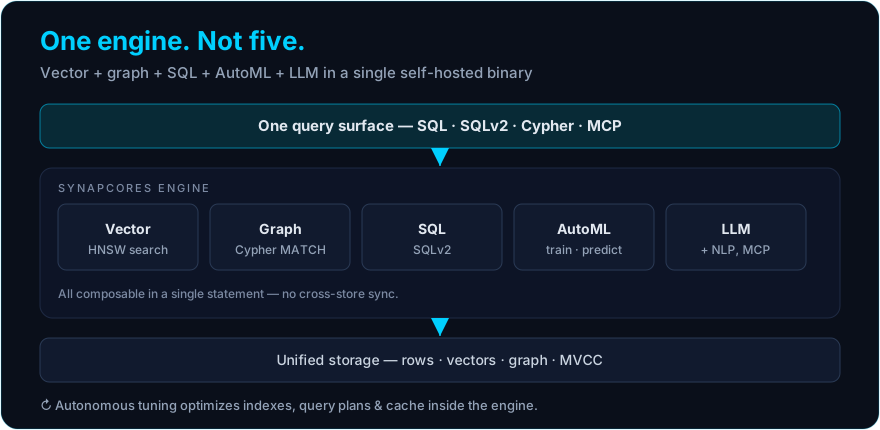
Most databases that call themselves "AI-ready" are a relational core with features stapled to the side: a vector extension here, a connector to an external model service there, a separate analytics warehouse downstream. An AI-native database is the opposite. The intelligence is not an add-on — it is the architecture. Vectors, graphs, relational rows, machine-learning models, and language-model calls all live inside one engine and share one query plan. This article walks through what that architecture actually looks like, layer by layer, and why the design choices matter for anyone building modern applications.
If you want the definition and a comparison of the options first, read the best AI-native databases in 2026; for distributed deployment and scaling, see the AI-native database platform guide. This piece goes one level deeper into the engine itself.
The system described here is SynapCores. It unifies vector search, a graph engine, SQL, and in-database AutoML in a single self-hosted binary, with native MCP support and an OpenClaw long-term-memory plugin built in. The Community Edition is free for macOS, Linux, and Docker. Download the free Community Edition → · Explore the features →
A note on scope. Capabilities marked (Enterprise / roadmap) are part of the SynapCores Enterprise tier or roadmap and are not in the free Community Edition today. Everything unmarked — unified vector + graph + SQL, in-database AutoML, RAG/GraphRAG, native MCP, and the OpenClaw memory plugin — ships in the free CE.
The core idea: one engine, many data models
A traditional stack treats every data model as a separate product. You run PostgreSQL for rows, Pinecone or Weaviate for vectors, Neo4j for graphs, a warehouse for analytics, and a model-serving layer for ML. Each system has its own storage format, its own query language, its own scaling story, and its own failure modes. The glue between them — the ETL jobs, the sync workers, the embedding pipelines — is code you write, own, and debug.
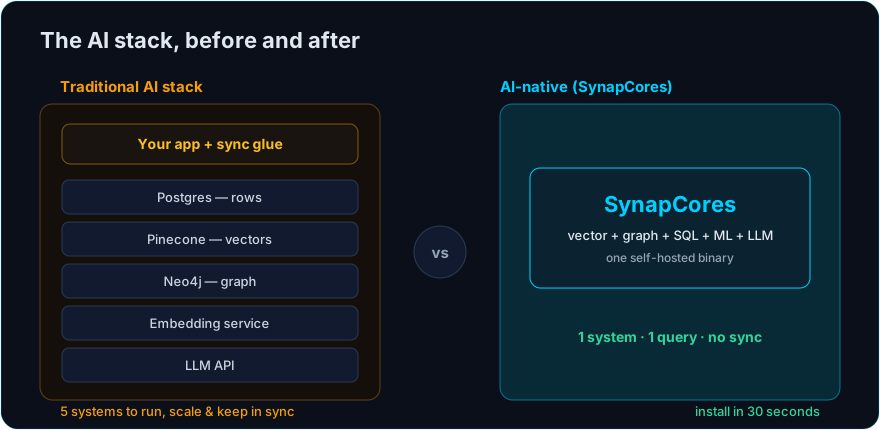
AI-native architecture collapses that stack. The storage engine understands vectors as a first-class column type, not as an opaque blob. The query planner can traverse graph edges and join relational tables in the same statement. The execution layer can call an embedding model or a language model mid-query without leaving the process. There is one place where data lives, one language to ask questions, and one optimizer deciding how to answer them.
The practical consequence is that a query like "find the documents semantically closest to this question, walk two hops out to related entities, filter by the user's permissions, and summarize the result" is a single statement against a single engine — not an orchestration problem spread across five services.
Layer one: unified storage
The foundation is a storage layer that holds heterogeneous data models in one format. Relational tables, vector embeddings, and graph nodes and edges are not stored in three separate subsystems that happen to share a process. They share a record format and a buffer pool.
This matters for a reason that is easy to miss: data locality. When your rows, your vectors, and your relationships sit in the same storage engine, a hybrid query reads them with one set of I/O paths and one cache. In a multi-store architecture, the same hybrid query fans out to three systems over the network, each with its own cache and its own latency tail. The unified design removes the network from the hot path entirely.
| Concern | Multi-store stack | AI-native unified storage |
|---|---|---|
| Data placement | Vectors, rows, graph in separate systems | One storage engine, shared buffer pool |
| Consistency | Sync jobs reconcile stores | Single transaction boundary |
| Hybrid query I/O | Network fan-out to 3+ services | Local reads, one cache |
| Operational surface | Several databases to run and patch | One binary to deploy |
Layer two: native vector indexing
Vector search is the access pattern most AI applications lean on, so the index for it cannot be a bolt-on. AI-native engines build approximate-nearest-neighbor indexing — typically HNSW — into the storage layer alongside B-tree and hash indexes. If you want the mechanics, the HNSW deep dive covers how the graph-based index achieves logarithmic search time.
The architectural point is that the vector index participates in query planning. The optimizer knows the cost of a similarity scan, knows the selectivity of a relational predicate, and can decide whether to filter first and then rank, or rank first and then filter. A bolt-on vector store cannot do this, because it never sees the relational predicates — they live in a different database.
-- The optimizer fuses the relational filter and the vector ranking
-- into one plan. No round-trip to an external vector service.
SELECT product_name, price,
       COSINE_SIMILARITY(embedding, EMBED('noise cancelling headphones')) AS relevance
FROM products
WHERE in_stock = true
  AND price < 300
ORDER BY relevance DESC
LIMIT 10;
Layer three: the graph engine
Relationships are their own data model, and reconstructing them with recursive SQL joins is both slow and painful to write. An AI-native engine stores typed nodes and typed edges natively and traverses them as a graph. This is what makes GraphRAG possible inside one system: vector similarity finds the seeds, and graph traversal expands outward to the connected context.
Because the graph engine shares storage with the vector index and the relational tables, a GraphRAG retrieval does not require a separate graph database kept in sync with a separate vector database. The seeds and the edges are in the same place. For the full comparison with a dedicated graph database, see GraphRAG vs Neo4j.
Layer four: in-database machine learning
This is the layer that most clearly separates AI-native from AI-adjacent. Instead of exporting data to a Python service, training a model, and importing predictions back, an AI-native engine trains and serves models inside the database. Functions like EMBED(), PREDICT(), and CREATE EXPERIMENT are part of the query language. The data never leaves the engine, so there are no extraction jobs, no serialization overhead, and no drift between the training snapshot and live data.
-- Train a model where the data already lives
CREATE EXPERIMENT churn_model
  PREDICT churned
  FROM customers
  USING AUTOML;

-- Use its predictions inside an ordinary query
SELECT customer_id, PREDICT(churned) AS churn_risk
FROM customers
WHERE plan = 'pro'
ORDER BY churn_risk DESC;
We cover the trade-offs of this approach in depth in In-Database ML vs External ML Pipelines and the AutoML side in What Is In-Database Machine Learning?.
Layer five: the language-model interface
The top layer connects the engine to language models. Native MCP (Model Context Protocol) support means the database can act as a tool server for agents directly, exposing its data and functions through a standard interface rather than a hand-rolled API. The OpenClaw memory plugin gives agents durable long-term memory backed by the same storage. Because the LLM interface sits on top of the unified engine, a model can retrieve context, traverse relationships, and run predictions in one round of interaction. This is the foundation for agentic workloads, covered in AI-Native Database for Agentic Systems.
How the layers compose
The architecture's value is not in any single layer — each one exists in some specialized product elsewhere. The value is in composition. One query can embed text, rank by vector similarity, traverse a graph, join relational tables, apply a trained model, and feed the result to a language model, all inside one optimizer's plan and one transaction. That is the definition of AI-native: not a database with AI features, but a database whose architecture is AI from the storage format up.
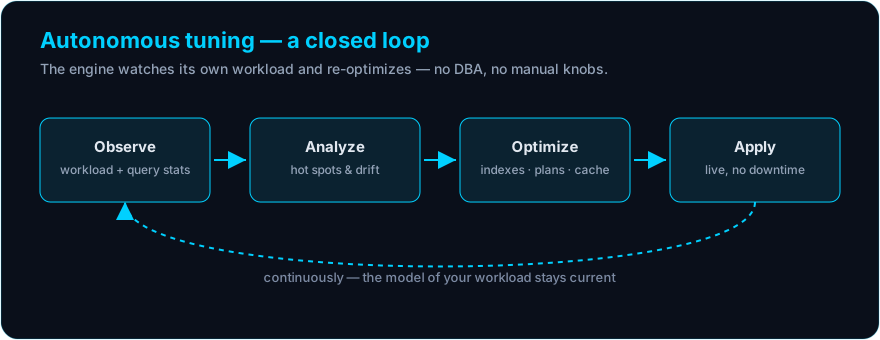
The autonomous-tuning layer that watches workloads and adjusts indexes and resources automatically (Enterprise / roadmap) sits above all of this, but the unified engine underneath is the part that changes how you build.
See it for yourself
The fastest way to understand the architecture is to run it. The free Community Edition is a single binary — vector, graph, SQL, and AutoML in one process — that installs in about 30 seconds on macOS, Linux, or Docker.
Download Free → · See the architecture → · See the live demos →