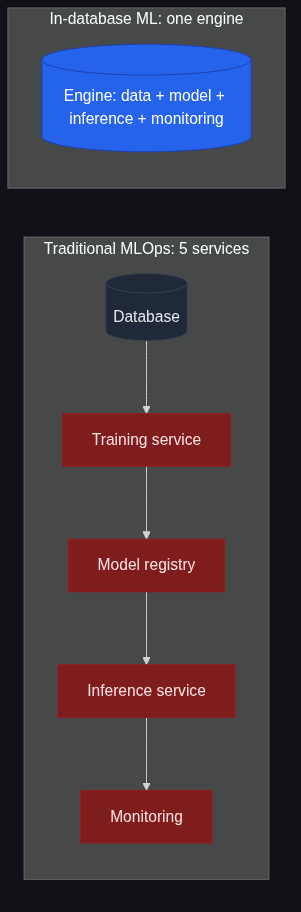
The first time I ran a production ML pipeline I spent two days writing the training code and two weeks wiring up the data movement, the model registry, the inference service, the feature store, and the monitoring. The model itself was about 200 lines of scikit-learn. The plumbing was about 4,000 lines of glue. That ratio — 5% useful work, 95% choreography between services — is the reason in-database machine learning exists as a category.
In-database machine learning means exactly what it sounds like: the training, the model artifact, the inference, and the monitoring all live inside the database that holds the training data. You write SQL. The database does the rest. No separate ML service, no model registry, no inference endpoint, no feature store, no orchestrator. There's still complexity — it's just complexity expressed as queries over a single engine instead of as deployments across five.
This post explains what in-database ML actually is, what it isn't, where it's the right answer, and where it isn't. The examples are SynapCores SQLv2 because that's the dialect I work in every day, but the category includes Redshift ML, BigQuery ML, MindsDB, MADlib on Postgres, and others. The category is older than people think.
What it is
In-database machine learning has three defining properties:
- Training data never leaves the database. No
SELECT * → CSV → S3 → Python notebook. The training query runs inside the engine, against the table, in place. - The model is a database object. Created with DDL (
CREATE MODEL ...), versioned and ACL'd like any other database object, dropped withDROP MODEL. - Inference is a SQL function.
PREDICT(model_name, features)is a scalar function you call from inside any query. No HTTP service in the loop.
If your stack has all three of those properties, you're doing in-database ML. If you train in a notebook and ship the artifact to an inference service, you're doing the traditional MLOps shape — which is fine, just not the same category.
A worked example
The canonical "predict customer churn" example, end to end, in SQL:
-- Training data lives in a table. No export.
SELECT customer_id, days_since_last_login, support_tickets_30d,
       avg_session_minutes, plan_tier, churned_within_30d
FROM customer_features
WHERE created_at < '2026-04-01';

-- Train a model with one statement
CREATE MODEL churn_predictor
TYPE classification
TARGET churned_within_30d
FROM customer_features
WHERE created_at < '2026-04-01'
ALGORITHM autoML
WITH (max_trials = 50);

-- Inference is a SQL function
SELECT customer_id,
       PREDICT(churn_predictor, ROW(
         days_since_last_login,
         support_tickets_30d,
         avg_session_minutes,
         plan_tier
       )) AS churn_risk
FROM customer_features
WHERE created_at >= '2026-05-01'
ORDER BY churn_risk DESC
LIMIT 100;

-- Inspect the model like any other DB object
SHOW MODEL churn_predictor;
That's the entire flow. There's no Python service, no model registry, no feature store, no deployment pipeline. The model artifact lives in the same database as the customer data, retraining is a CREATE OR REPLACE MODEL, monitoring is a SELECT over the predictions table.
It's worth pausing on what isn't there. There's no:
- Train/test split utility — the engine does it.
- Hyperparameter search loop — AutoML handles it.
- Feature engineering pipeline as a separate artifact — the features are columns.
- Model packaging step — the model is a database object.
- Deployment to an inference service —
PREDICT()is the inference service.
Why it matters
In-database ML matters because it eliminates the seams. The traditional ML pipeline has seams at every interface:
- Database → training service: data movement, schema drift, serialization.
- Training service → model registry: artifact versioning, storage tier.
- Model registry → inference service: deploy cadence, rollback.
- Inference service → application: HTTP latency, error handling, retry logic.
- Application → monitoring: prediction logging, drift detection.
Each seam is solvable in isolation. The aggregate cost is what kills teams. The classic statistic — that "87% of ML projects never reach production" (per VentureBeat's coverage of an Andrew Ng quote) — is not because the models are bad. It's because the pipeline assembly is hard. Every seam is a place a project can die.
In-database ML collapses every seam into "it's all SQL." The data, the model, the inference, the monitoring — same engine, same transaction, same audit trail.
The four real benefits
Stripping out the marketing and being concrete:
1. Data movement cost goes to zero
The biggest hidden cost in a traditional ML pipeline is moving the training data out of the database and the inference results back in. For a table with millions of rows, that's bandwidth, serialization, and time. When training runs in-place, the cost is zero — the database is already holding the bytes.
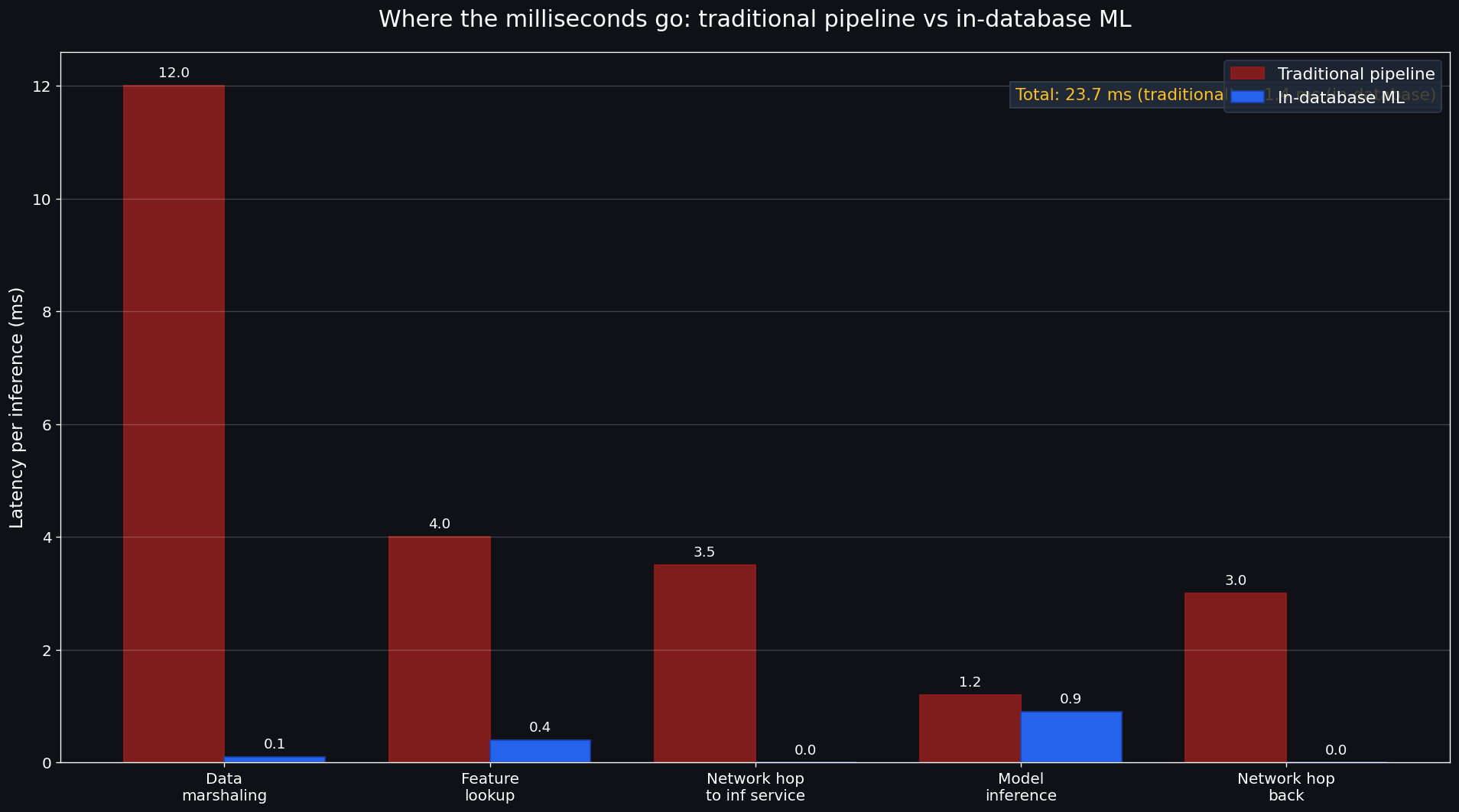
We measured this on a 5M-row customer dataset on our own infrastructure: traditional pipeline (Postgres → Python → scikit-learn → model file → Flask inference) had ~40% of total training time in data marshaling. In-database training cut that to ~3% (the residual is internal serialization for parallel workers). The model itself trained faster because the engine could exploit columnar storage directly.
For the broader argument on data movement cost, see Why Traditional Databases Fail Modern AI Workloads.
2. Feature engineering is just SQL
A feature in the traditional MLOps world is a thing you define in a feature store DSL, materialize on a schedule, and serve through an API. A feature in in-database ML is a SELECT expression. That's it.
-- Feature engineering is a CTE
WITH features AS (
  SELECT customer_id,
         DATEDIFF('day', last_login, NOW()) AS days_since_last_login,
         COUNT(*) FILTER (WHERE created_at > NOW() - INTERVAL '30 days') AS tickets_30d,
         AVG(session_minutes) AS avg_session
  FROM customer_events
  GROUP BY customer_id
)
CREATE MODEL churn_v2
TYPE classification
TARGET churned
FROM features JOIN customer_state USING (customer_id);
No feature store. No DSL. No materialization schedule. The features are SQL, the training is SQL, the inference is SQL. When a feature definition changes, you change one CTE.
3. The model is a database citizen
Backups include the model. Replication includes the model. Permissions on the model are GRANT/REVOKE. Audit logs include who trained which version. Time-travel queries (where supported) include the model state at a past timestamp. These are not features you have to bolt on — they fall out of the model being a real database object.
The first time I had to roll back a bad model in production on a traditional stack, it was a coordinated outage between three teams. The first time I rolled one back on an in-database setup, it was DROP MODEL churn_v3; -- v2 is still there.
4. Inference latency drops
A traditional inference pipeline does: application → HTTP → inference service → load model → predict → HTTP back. Even with a warm inference service, that's 3-15ms of overhead before the model runs.
SELECT PREDICT(model, row) FROM ... runs in the same process as the SQL query. Inference latency for a typical gradient-boosted tree model is well under a millisecond. For batch inference (thousands of rows at once), it's vectorized and even faster.
This matters for real-time use cases — fraud scoring on every transaction, recommendation re-ranking on every page load, churn prediction inside a customer-support dashboard.
Where in-database ML doesn't fit
I want to be honest about the limits. In-database ML is not the right answer for every ML workload.
Deep learning at scale
Training a billion-parameter LLM is not happening in your database. It's not happening in anyone's database. Deep learning at scale needs distributed GPU clusters and frameworks (PyTorch, JAX) tuned for them. In-database ML is a great fit for classical ML (tree ensembles, regressions, time-series forecasting) and small-to-medium neural networks. It is not a replacement for PyTorch on a 64-GPU cluster.
What in-database ML can do is host the inference of a pre-trained model, even a large one, as a function. SynapCores' GENERATE() function does this — the model is loaded once, the SQL function calls it inline. Training stays elsewhere; serving lives in the database.
Research workflows
If you're an ML researcher exploring 30 different architectures, in-database ML feels constrained. You want a notebook with full Python flexibility, custom loss functions, weird optimizers, half-finished ideas. That's a notebook workflow, not a SQL workflow.
The line I draw: research belongs in notebooks; production belongs in the database. The handoff is "the notebook produced a model class; let's port the production version into the database now."
Highly custom feature pipelines
If your features require streaming windowed aggregations across Kafka topics with custom Python UDFs, you have a streaming-feature-engineering problem that's bigger than what most databases (in-database ML or otherwise) handle elegantly. Specialized streaming ML platforms exist for this. Don't try to force it.
The category, today
The in-database ML category is older than most engineers realize:
- MADlib (open-source, since ~2011) brings ML algorithms to Postgres and Greenplum.
- BigQuery ML (since 2018) does CREATE MODEL + ML.PREDICT in BigQuery.
- Redshift ML (since 2020) brings AWS SageMaker's training into Redshift queries.
- MindsDB treats ML models as tables/views in Postgres/MySQL/etc.
- SynapCores AutoML (the engine I work on) brings AutoML training + inference + GENERATE/EMBED to a unified AI-native database.
Each has its own dialect and its own opinionated tradeoffs. The category is what matters, not the brand.
A cost rule of thumb
Here's the heuristic I use when teams ask "should we do in-database ML?":
- Fewer than 10 models in production? It's almost certainly worth it. Pipeline complexity dominates and in-database collapses it.
- More than 100 models, custom infrastructure team, deep MLOps maturity? The pipeline tooling is already paid for. The marginal benefit is smaller. You may still want it for the data-movement saving on specific model types.
- Building a greenfield AI app today? Default to in-database. The seam-elimination is highest in greenfield projects because you don't have a pipeline to migrate.
The most expensive thing in ML isn't the model. It's the operational scaffolding around the model. In-database ML deletes scaffolding.
A short demo path
If you want to feel the difference yourself:
- Download the Community Edition.
- Import a sample CSV (anything with a target column — the AutoML guide has examples).
CREATE MODEL my_first_model TYPE classification TARGET ... FROM ....SELECT PREDICT(my_first_model, ...) FROM ....
The whole loop is 4 statements. If you've been operating on the traditional pipeline shape, the lack of moving parts is the part you have to feel to internalize.
How this connects to the rest
In-database ML is the broader category. The specific subcomponents — vector search (HNSW Explained), graph traversal (What Is GraphRAG?), in-SQL LLM calls (What Is SQLv2?) — all fall under the same umbrella: AI primitives live next to the data, called from one query language, in one engine.
If you're convinced this is the right architecture for your team, the Agent Memory JumpStart is the 2-4 week sprint where we wire SynapCores into your real workflow — including the model lifecycle, not just the retrieval. Free Design Partner track or fixed-fee Paid Pilot from $5,000.
The honest version
We don't have customer logos yet. The in-database ML category is older than us; we're one player in it. What I can claim with a straight face is that we built SynapCores' AutoML path because we hit the seams above on previous products and got tired of writing the same orchestrator twice. The CE ships with it; run it on your data and judge.