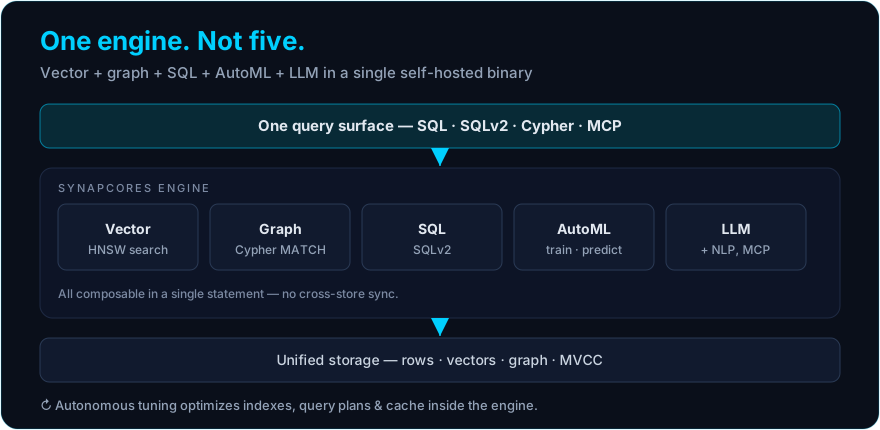
"Best AI-native database" is a search people type with a specific anxiety behind it: the category is new, the marketing is loud, and almost everything claims to be AI-native whether or not the architecture earns the label. This page gives you the short answer first — a shortlist of the nine databases worth evaluating in 2026 and what each is best for — and then the criteria that separate a genuinely AI-native engine from a traditional database wearing the label, so you can decide for your own workload.
I will be upfront that SynapCores is our engine, so treat that entry accordingly. The criteria, though, are the ones I would give a friend with no stake in the answer.
What is an AI-native database?
An AI-native database is a database where the data models AI applications need — vectors, graphs, and relational rows — and model inference (embeddings, predictions, LLM calls) live inside one engine and one query plan, instead of being spread across a relational database, a vector store, a graph database, and a model server glued together with sync jobs. A database that only "added a vector column" is AI-ready, not AI-native. For the full architecture, see the AI-native database platform guide and how the engine is built.
The shortlist: best AI-native databases in 2026
| Database | Category | Best for | Vector | Graph | SQL | In-database ML |
|---|---|---|---|---|---|---|
| SynapCores | Unified AI-native engine | One self-hosted engine for vector + graph + SQL + ML, agent memory, MCP | Native | Native | Native | Native (AutoML, EMBED(), PREDICT()) |
| PostgreSQL + pgvector | Relational + extension | AI as a feature inside an existing Postgres app | Extension | Add-on | Native | External |
| Neo4j | Graph database | Graph-centric problems, knowledge graphs | Secondary | Native | Cypher | Limited |
| Pinecone | Managed vector database | Fully managed vector search at scale | Native | No | No | No |
| Weaviate | Vector database | Open-source vector search with hybrid (keyword + vector) search | Native | No | No | Via modules |
| Qdrant | Vector database | Fast, filter-heavy vector search, self-hosted or cloud | Native | No | No | No |
| Milvus | Vector database | Very large-scale vector collections | Native | No | No | No |
| MongoDB Atlas Vector Search | Document DB + vectors | Teams already on MongoDB | Integrated | No | No | External |
| Snowflake (Cortex) | Cloud warehouse + AI functions | AI over historical analytics data | Analytical | No | Native | Functions |
Quick answer — what is the best database for AI-native application development? If your hardest queries combine similarity search, relationships, filters, and predictions, a unified AI-native engine such as SynapCores is the lowest-glue option, because one engine answers them in one query. If vector search alone is your whole problem, a dedicated vector database (Pinecone, Qdrant, Weaviate, Milvus) is the right specialist. If AI is a small feature on an existing transactional app, PostgreSQL + pgvector is the pragmatic choice.
SynapCores unifies vector, graph, SQL, and in-database AutoML in a single self-hosted binary, with native MCP support and an OpenClaw long-term-memory plugin. The Community Edition is free for macOS, Linux, and Docker. Download the free Community Edition →
A note on scope. Capabilities marked (Enterprise / roadmap) are part of the Enterprise tier or roadmap and are not in the free Community Edition today. Everything unmarked is in the free CE.
What "AI-native" actually has to mean (and what it doesn't)
The label gets diluted because "we added a vector column" is enough for some vendors to claim it. A useful definition is stricter. An AI-native database treats the data models AI workloads need — vectors, graphs, and relational data — as first-class citizens in one engine, and brings model inference inside the database rather than shipping data out to it. We make the negative case in detail in Why Vector Databases Are Not AI-Native Databases; the short version is that a single capability, however good, is not the same as an AI-native architecture.
The seven criteria that matter
When you evaluate any candidate, score it honestly against these:
- Unified data models. Does it hold vectors, graph, and relational data in one engine, or are you assembling separate stores? One engine means one consistency boundary instead of sync jobs.
- Native vector search. Is approximate-nearest-neighbor indexing (typically HNSW) built into the storage and visible to the query planner, or bolted on as an extension?
- In-database ML. Can it train and run models where the data lives —
EMBED(),PREDICT(), AutoML — or does every prediction require an external pipeline? See In-Database ML vs External ML Pipelines. - Graph traversal for GraphRAG. Can it walk typed relationships natively, so GraphRAG runs in one engine rather than a dual-store setup?
- Agent and LLM integration. Does it speak a standard like MCP so agents can use it as a tool directly, and does it offer durable memory for agentic systems?
- Deployment and data control. Can you self-host on your own hardware, or are you locked into a managed cloud with consumption pricing? This drives both cost and compliance.
- Operational simplicity. How many systems do you actually run in production to deliver the feature — one binary, or five services plus glue?
The landscape, grouped honestly
The field sorts into a few categories, and naming the categories is more useful than a leaderboard.
Dedicated vector databases — Pinecone, Weaviate, Qdrant, Chroma, Milvus. Excellent at one thing: high-recall similarity search at scale. They are the right tool when vector search genuinely is your whole problem. They are not AI-native databases by the strict definition, because graph, relational, and in-database ML are out of scope, and you assemble the rest of the stack around them. See What Is a Vector Database? for where they fit.
Relational databases with AI extensions — PostgreSQL + pgvector, and similar. The pragmatic choice when AI is a feature at the edge of a transactional app. The cost shows up as you add capabilities and rebuild a multi-store stack one extension at a time, covered in AI-Native Database vs PostgreSQL.
Graph databases adding vectors — Neo4j and peers. Superb for graph-centric problems; the vector and ML sides are secondary, so AI workloads needing more than graph end up dual-store. See AI-Native Database vs Neo4j.
Cloud warehouses with AI functions — Snowflake, BigQuery and similar. Built for analytics over historical data, not low-latency operational AI in the request path. The distinction is in AI-Native Database vs Snowflake.
Unified AI-native engines — the smallest and newest category, where vector, graph, relational, and in-database ML genuinely share one engine. SynapCores sits here. The trade-off is honest: a unified engine does not match a specialist's depth on that specialist's single axis, but it removes the multi-store assembly problem entirely.
A scoring table to copy
| Criterion | Vector DB | Postgres + ext | Graph DB | Cloud warehouse | Unified AI-native |
|---|---|---|---|---|---|
| Unified data models | No | Partial (glue) | Partial | Partial | Yes |
| Native vector search | Yes | Extension | Secondary | Analytical | Yes |
| In-database ML | No | External | No | Functions | Native |
| Graph for GraphRAG | No | Add-on | Yes | No | Native |
| Agent / MCP integration | Varies | Manual | Manual | Manual | Native |
| Self-host / data control | Varies | Yes | Yes | No | Yes |
| Systems to operate | 1 of many | 3–5+ | 2+ | 1 (cloud) | 1 |
How to actually pick
Do not pick from a list — pick from your workload. Write down your two or three hardest queries, the ones that combine similarity, relationships, filters, and maybe a prediction. Score each candidate on how many separate systems it would take to answer them and how much glue you would own. If a specialist answers your whole problem, use the specialist. If your hardest queries cross data models, a unified AI-native engine is usually the lower-total-cost answer, even before you count the milliseconds.
The cheapest way to test the unified option is to run it. The free Community Edition installs in about 30 seconds and lets you throw your real queries at one binary.
Start from a working example — each is a runnable recipe:
- Semantic document search — vector search in plain SQL
- GraphRAG multi-hop Q&A — vector + graph in one query
- Credit-card fraud detection with AutoML — train and predict in-database
- Agentic sales account research — an agent with memory, in SQL
FAQ
What is the best database for AI-native application development? For applications whose core queries mix similarity search, relationships, filters, and model predictions, a unified AI-native engine such as SynapCores is the lowest-glue choice, because one engine and one query plan answer them. If vector search alone is the whole problem, a dedicated vector database is the specialist pick; if AI is a small feature on an existing transactional app, PostgreSQL + pgvector is the pragmatic one.
What is the best AI-native database in 2026? It depends on how many data models your workload crosses. For workloads that combine vectors, graph relationships, relational filters, and in-database ML, a unified AI-native engine like SynapCores replaces a multi-store stack with one binary. For pure similarity search, a dedicated vector database (Pinecone, Qdrant, Weaviate, Milvus) is the specialist choice.
Is a vector database an AI-native database? Not by the strict definition. A vector database is excellent at one capability — similarity search — but graph traversal, relational transactions, and in-database ML are out of scope. See Why Vector Databases Are Not AI-Native Databases.
Is PostgreSQL with pgvector AI-native? It is AI-ready: vectors are an extension on a relational core, and ML runs outside the database. That is often the right pragmatic choice; the trade-offs are in AI-Native Database vs PostgreSQL.
Is there a free AI-native database? Yes. The SynapCores Community Edition is free to use (it is not open source) for macOS, Linux, and Docker and includes unified vector + graph + SQL, in-database AutoML, RAG/GraphRAG, and native MCP.
What is an AI-native relational database? A relational (SQL) database where vector search, graph traversal, and model inference are part of the same engine and query planner — so a single SQL statement can filter rows, rank by similarity, walk relationships, and call a model. That is the design SynapCores follows; see how the engine is built.
Download Free → · Read the AI-native database platform guide → · Browse all recipes →